
Autofill behavior in modern browsers can sometimes feel confusing—especially when suggestions suddenly stop appearing even though data is still being entered correctly. In Microsoft Edge, this behavior is often caused by a feature called the Client Repeatable Feature.
This article explains how Autofill works in Edge, how Frequently Saved Data (FSD) and Parsable Name are used, why Autofill suggestions get blocked, and how this behavior differs from other Chromium-based browsers like Google Chrome.
How Autofill Works in Edge
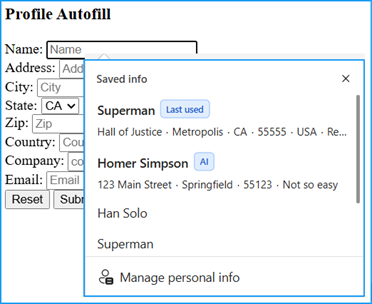
At a basic level, Microsoft Edge stores and reuses form data based on the name of a form field. More precisely, it uses a value called the Parsable Name.
If two input fields share the same Parsable Name, Edge assumes they represent the same type of data and will show the same Autofill suggestions for both fields.
For example, if a field called EmailAddress exists in two different forms, Edge will show the same Autofill values in both—even if those forms are completely unrelated.
This behavior is part of the Frequently Saved Data (FSD) feature.
Frequently Saved Data (FSD) and Chromium
The Frequently Saved Data (FSD) feature originates from the Chromium project and is used by Microsoft Edge. Because of this, this part of Autofill behavior should be identical to other Chromium-based browsers, such as Google Chrome.
An important detail is that FSD works across domains. It is not limited to a specific website or URL.
This means that a field with the Parsable Name EmailAddress on
www.contoso.com/someform
will show the same Autofill suggestions as a field with the same Parsable Name on
www.microsoft.com/someotherform.
FSD only cares about the Parsable Name, not the website, URL, or form structure.
What Is the Client Repeatable Feature?
The Client Repeatable Feature is a Microsoft Edge–specific feature. It does not originate from the Chromium project. Because of this, its behavior may differ from what you see in Google Chrome or other Chromium-based browsers.
This feature is designed to reduce noisy or repetitive Autofill suggestions. It does this by monitoring how many different values are entered into a field within the same form.
When and Why Autofill Gets Blocked
If five different values are entered consecutively into the same field within the same form, the Client Repeatable Feature becomes active.
When this happens:
- Autofill suggestions are blocked
- No suggestion popup is shown
- New values are still saved internally
The key point is that this blocking is form-specific.
Edge identifies a form using a hash value called Form SignatureV2. The Autofill block applies only to the form with that specific Form SignatureV2.
If another form exists with:
- a different Form SignatureV2
- but the same Parsable Name
Autofill suggestions will still appear in that other form—until the same five-value rule is triggered there as well.
How to Unblock Autofill Suggestions
Blocking caused by the Client Repeatable Feature is not permanent.
To remove the block, one of the five previously entered values that were stored as Frequently Saved Data (FSD) must be typed again in full.
Partial input is not enough. Typing only part of a previously used value will not lift the block.
Once a complete previously saved value is entered:
- Autofill suggestions become visible again
- All values that were saved during the blocked phase will also appear
However, unblocking only resets an internal counter. If five new, different values are entered consecutively again, the block will be reactivated.
Clearing Autofill Data via Edge Settings
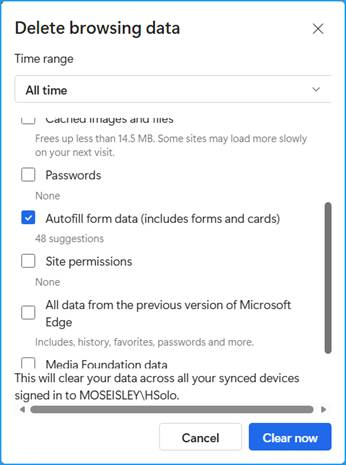
In addition to unblocking Autofill by re-entering a previously saved value, all Autofill suggestions can also be removed manually via the Edge settings.
Autofill data can be cleared under:
edge://settings/privacy/clearBrowsingData
In the Delete browsing data dialog:
- Set Time range to All time
- Enable Autofill form data (includes forms and cards)
- Click Clear now
This removes all saved Autofill entries, including data affected by the Client Repeatable Feature.
Debugging Autofill Behavior in Edge
Microsoft Edge provides a useful debugging option to better understand Autofill behavior.
By enabling Show Autofill Predictions under
edge://flags
you can inspect Autofill metadata directly.
After enabling the flag, hovering over a form field will display values such as:
- Parsable Name
- Form SignatureV2
This makes it much easier to understand why Autofill suggestions appear—or why they don’t.
For hands-on testing, Autofill behavior can also be explored on the Autofill Smoke Test page: https://rsolomakhin.github.io/autofill/
Inspecting Autofill Data on Disk (Advanced)
Autofill data in Microsoft Edge is stored locally on disk in a SQLite database file named Web Data.
The file can be found at:
C:\Users\<username>\AppData\Local\Microsoft\Edge\User Data\<profilename>\Web Data
Key details:
- The file uses SQLite format
- It contains Autofill-related tables and metadata
- It can be inspected using common SQLite viewers such as DB Browser for SQLite
https://sqlitebrowser.org/dl/
This is useful for advanced debugging scenarios, for example when validating which values are stored internally or confirming that data is still saved even when Autofill suggestions are temporarily blocked.
The Last Used Feature
For completeness, Edge also includes the Last Used Feature. This feature does not affect the blocking behavior described above and is mentioned here for informational purposes only.
Last Used uses information from the entire form—not just the field name—to determine which value was entered most recently. Differences in labels or surrounding text can be enough to distinguish forms.
To do this, the feature also relies on Form SignatureV2.
Final Thoughts
Understanding the difference between Parsable Name, Frequently Saved Data (FSD), and the Client Repeatable Feature helps explain many Autofill behaviors that might otherwise look like bugs.
In short:
- FSD is Chromium-based and works across domains
- Client Repeatable Feature is Edge-specific and form-scoped
- Autofill blocking is temporary and counter-based
Once these concepts are clear, Autofill behavior in Edge becomes far more predictable—and much easier to debug.
Leave a Reply
You must be logged in to post a comment.